Interactive Word Search ("Mots mêlés")
Hello !
Welcome to my fourth post on the 'other' page. For better visibility, I advise you to read my posts on a computer and on my website (if you are reading this from the newsletter) by clicking just above on "View in browser", rather than directly from the email.
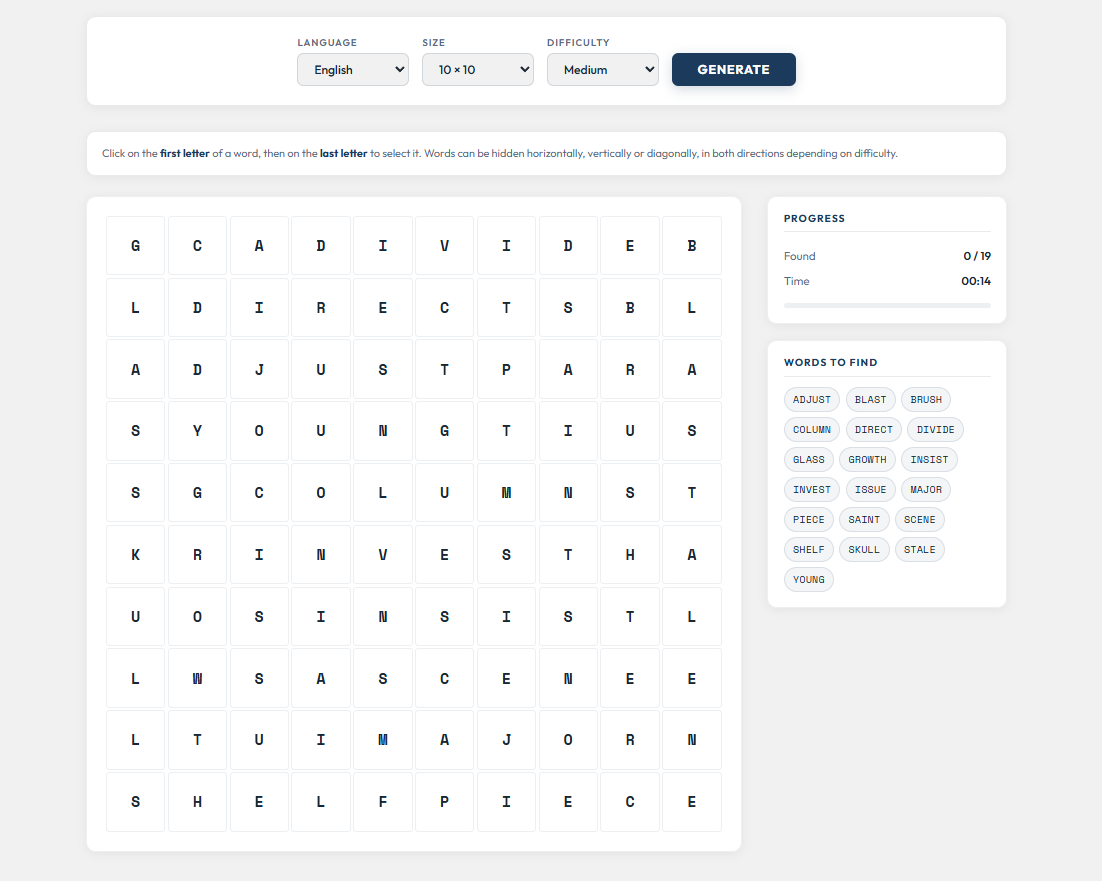
Today, something a bit different from the usual data visualizations: an interactive word search game, entirely generated with R!
The idea
I wanted to explore a fun side project combining my interest in sports vocabulary with the technical challenge of generating a complete browser game from R. The result is a bilingual (French/English) word search puzzle where you need to find hidden words in a grid, then guess a mystery word from the remaining letters.
How to play
- Click on the first letter of a word, then on the last letter to select it (or vice versa)
- Words can be hidden horizontally, vertically or diagonally, depending on the difficulty level
- Once all words are found, the leftover letters reveal a mystery word — guess it to win!
- You can switch between French and English, adjust the grid size (10×10 to 15×15), and choose your difficulty
Try it out below!
How it's built
The whole game is generated by a single R script. Here's the general workflow:
-
Dictionaries: ~1300 French words and ~1200 English words, all uppercase and accent-free, plus around 40 mystery words per language (each with a definition/hint)
-
Grid generation algorithm: the R script places words one by one on the grid, checking for collisions and ensuring each word has at least one unique letter not shared with any other word. The key constraint is that after all words are placed, the number of empty cells must exactly match the length of the mystery word — those empty cells then receive the mystery word's letters in reading order
-
HTML template: a standalone HTML file with all the CSS and JavaScript for the game interface. The R script injects the word dictionaries as JSON into the template and outputs the final playable HTML file
-
Regeneration in the browser: the JavaScript in the template mirrors the same placement algorithm, so clicking "Generate" creates a brand new grid without any server or page reload
The grid generation is the trickiest part — it needs to balance word placement density with the exact number of empty cells required for the mystery word. The algorithm uses up to 100 attempts with different random shuffles to find a valid configuration.
Thanks for reading! I hope it was clear and you enjoyed it.
You will find the code below by clicking the github link button.
If you have any questions or remarks, I invite you to create an account (it's free) to write a comment, or simply to be notified of a new post in the future !
See you soon for new content 👋
 MaximeDeniaux

Comments ()